
MovieBox
Movie Box APK downloads the latest version 2026 for free on Android that lets you stream all your favorite movies and TV shows without any subscriptions.
Security Verify
McAfee
F-Secure
AdBlock
MovieBox is a popular streaming app that lets users enjoy their favorite movies and TV shows. Users can enjoy all their favorite content without any trouble on their handy device. This streaming app can convert their smartphone into an all-in-one streaming hub. They can easily access millions of entertainment titles that they like the most. Nowadays, in the world of digital entertainment, streaming apps are highly popular. Users can enjoy HD-quality content because of streaming apps. Moviebox APK latest version has its special identity in the film industry.
It’s only possible because of useful features, HD-quality content, and a huge collection of movies. Movie Box offers users all premium content without paying a single penny. It’s a third-party streaming app that’s available for Android, iOS, and PC devices. It doesn’t host any content on the app. It gathers links from the internet to provide you with free streaming on your phone. When you tap on any link, the app connects you with a fast streaming link.
MovieBox APK is the most popular entertainment app for users who want to enjoy Hollywood and Bollywood content. Yes, it is an ideal app that’s especially available for Android phone users. All the premium and VIP content is available for free. In that way, you can get free access to millions of shows and movies. Moreover, content of all categories and genres is available. Users can easily access action, romance, comedy, drama, thriller, suspense, sci-fi, and fantasy content.
Additionally, access content in multiple languages. Choose the language of your comfort. Urdu, English, Hindi, Tamil, Telugu, and other regional languages audio dubbed content is available. Users can easily download the content of their interest to the device gallery. They can stream movies without paying on the internet.
Huge Content Library
Users can enjoy a large collection of entertainment titles. Here, Bollywood, Hollywood, and South Indian content is accessible. Enjoy movies, TV shows, web series, and other entertainment titles according to your taste and interest.
Full HD and 4K Streaming Quality
Are you thinking it’s a free app that will offer low-quality videos? Then you are wrong. Moviebox APK app offers you full HD and 4K streaming without any subscriptions. Enjoy high-quality videos on your phone. Also save HD-quality content.
Offline Download Support
Save videos to stream when you don’t have an internet connection. Yes, you can easily play the videos while traveling and in areas where you don’t have a stable internet connection to enjoy live streaming. Thus, always save some of your favourite movies for offline viewing.
Multiple Subtitles Supports
If you are a fan of foreign content, then choose subtitles to better understand the story. Sometimes users also like to watch Marathi, Bengali, Telugu, or Tamil movies. Then, they can choose English, Urdu, or Hindi subtitles in the MovieBox APK app to understand the dialogues.
Daily Content Updates.
The most interesting feature of the platform is content updates. The app can update the videos without any trouble. You can stream new content without any delay. Regular Updates also can fix app issues such as bugs or performance issues.
Built-in Media Player
No need to use a separate media player. In the MovieBox application, built-in media player support is available. Choose your favourite movie and simply tap on the play button. In a few seconds, you can enjoy your favourite movie on your phone screen.
External Player Support
External Player Support is also available. You can easily use external players such as VLC or MX Player. If the built-in player is not working well, then use the latest version of the external player for a better viewing experience on your phone.
Clean and User-Friendly Interface
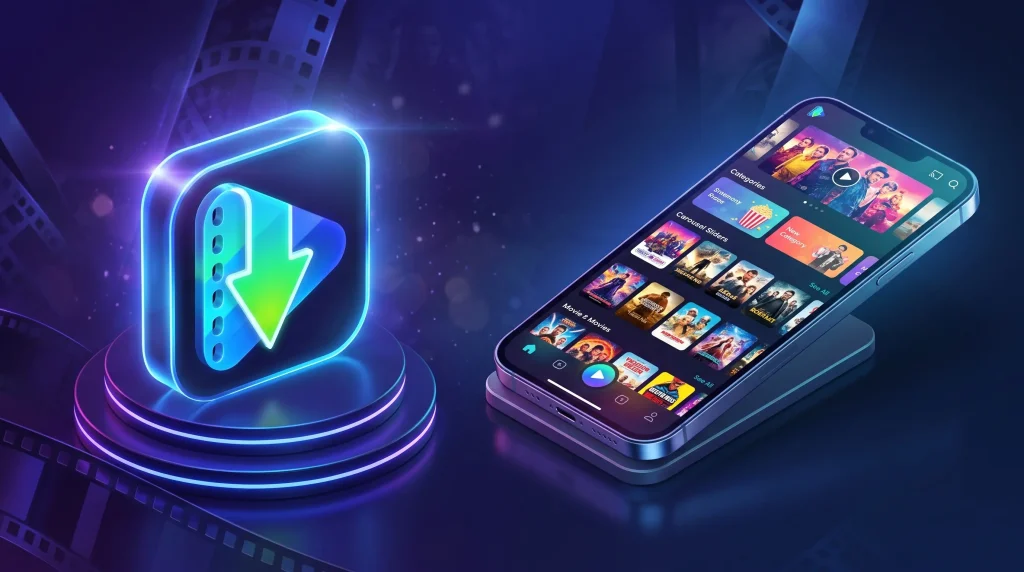
Moviebox Pro download has a simple and user-friendly interface. Thus, users can enjoy a well-organized layout design. Now, access different options without any confusion. Here, all the content is well-organized. All the options are clearly visible on screen.
Category and Genre Filters
Content is organized in different categories and genres. Thus, you can easily find your favorite content. Open the category or genre of your choice. Now, search for the content of your interest. In a few seconds, you can access the content.
No Registration
Yes, you can directly play the videos. Account creation is not required. Open the moviebox download android and search for your favorite content. Now, tap on the play button to start streaming. There’s no need to follow any complicated process of registration and sign-up.
MovieBox App offers users content of multiple types and categories. Yes, in one place you can experience content of multiple genres. Now, enjoy all your favorite content without jumping from one place to another. You can enjoy movies, TV shows, web series, anime, and documentaries. Moreover, action, romance, comedy, drama, thriller, suspense, sci-fi, adventure, fantasy, mystery, and historical content is available.
Thus, old classics and new blockbuster movies are accessible without paying a single penny. Another interesting aspect is that content is available in categories. You can easily access options. The question that comes to users’ minds is how to use the app. It’s easy to use for everyone. Users can easily browse the content and play in one click. Additionally, the option to “download” is available for movies and shows.
MovieBox APK downloads the latest version on Android phones. It’s very easy to download the third-party application on Android devices. Open the browser on your phone and search for the latest version. Avoid downloading the outdated version because of malware and virus problems. These types of versions are harmful to your device security. You can open a secure and virus-free website and in a one-click download the setup file.
Thus, choose that page for your device security and privacy. Tap on the given download button on the download page. With one tap, the file will automatically save in the Downloads folder. Now, allow the permissions that are important for installing the app. After that, without login or sign-up issues, you can stream your favorite content.
Download MovieBox on an Android phone without any hassle. Follow these guidelines to install the app.
Download Setup File
Open your phone and search for the latest version of the application. Choose our website and, in a few seconds, save the installation file.
Allow Permissions
Now, open Settings> Security and allow necessary permissions. Only tap on the “Enable” button to allow unknown sources.
Start Installation
It’s time for installation. Open your device file manager in Settings and locate the downloaded file in the Download Folder. Lastly, tap on the install option.
Open Application
You need to wait for a few seconds so that the Installation Process completes. After that, open the app and allow the necessary permissions to use it.
If you have a PC, then you can also download the app on PC. Download MovieBox for PC through an Android emulator. Follow these guidelines.
- Open your PC and, in the browser, enter the application name. Here, the screen will show you a list of related websites.
- It’s important to choose reliable sources that offer you a 100% secure and malware-free APK.
- Choose our website and, without any complicated setup, save the installation file to your PC storage.
- Now, again, it’s time to choose official or trusted sources to save the installation file of an Android emulator.
- Without an Android emulator, you can’t install third-party apps on a PC. Therefore, choose a good emulator.
- Install and launch the emulator with easy setup. Allow the required permissions and start installation.
- However, the installation is not simple. You need to import the APK file into your Android emulator to start the installation.
- Now, the process will take only a few seconds. Thus, you can open the app in the emulator and enjoy your favorite movies.
Not at all; it’s not an official application. Therefore, its availability on iOS devices is not possible. Additionally, users can’t access the MovieBox iOS APK version on iOS devices. The operating system of the iPhone is completely different from the Android phone operating system. Therefore, it’s not possible to use the APK version on iOS devices. Users can use alternative apps to stream their favorite content. Additionally, alternative methods are also available to use third-party applications on iOS devices. Such as third-party installers and jailbreak methods. On the other hand, these methods are risky for your iPhone security and mobile performance.

Users who are not well aware of the functionality of MovieBox Pro are curious about its popularity. However, those who are already using the app are 100% satisfied with its performance. It’s popular because of the availability of thousands of movies and shows. Users have a great opportunity to access all their favorite TV shows in one small app. This app can bring all Bollywood and Hollywood movies to your phone’s small screen without paying a single penny. Users have a box of movies on their phone.
It’s the same as a mystery box. You don’t know what’s in the box. Moreover, HD-quality content makes it useful. Users can enjoy crystal-clear voice quality and clear pictures. Multiple-language support and subtitle support also make it convenient. If you are also interested in streaming content from different regions on your phone. Then, use it for an enjoyable viewing experience without any subscriptions.
MovieBox Online provides users with a wide collection of movies. However, sometimes users don’t want to stream movies. Additionally, some users want to enjoy K-dramas and Japanese anime. In that app, you can access thousands of movies and a small number of other content categories. Additionally, other users prefer their security. Therefore, they don’t like this app. However, you don’t need to worry. The app also has some powerful alternatives. Users can use its alternatives that offer different types of content with multiple features.
Picasso
Picasso is known as an entertainment app that users may consider for movies, TV shows, and other video content. Its available features and content can vary by version and region. Before installing it, check the source and review the permissions it requests. Also, make sure the content comes from authorized providers. This helps you avoid suspicious downloads and unwanted apps.
HiTV
HiTV is an option for viewers who enjoy Asian entertainment, especially Korean dramas and other regional shows. Its interface helps users browse available titles and explore different categories. Depending on your location and the current service, the available library may differ. If you mainly watch Korean dramas, HiTV may be a more suitable choice than a general movie streaming app.
LokLok
LokLok is another name associated with online entertainment and Asian video content. Users may find it useful when looking for dramas, films, and other shows in one place. However, its content selection, availability, and features can change over time. Check whether the service is officially available in your region before using it. Choose legitimate viewing options whenever possible.
4. TV Garden
TV Garden is associated with browsing internet television streams from different locations. Unlike movie-focused apps, it is more suitable for users who want to explore live TV channels. The channels and streams available may vary, and not every stream is guaranteed to work. Check the source and broadcasting rights before watching a channel. It may suit viewers who prefer live television over on-demand movies.
5. BeeTV
BeeTV is known as a third-party streaming application that has been associated with movies and TV shows. However, its availability, reliability, and content sources may vary. Users should be careful with unofficial downloads because they can contain security risks or links to unauthorized streams. Before choosing BeeTV, consider whether a licensed streaming platform offers the same content with better support and more reliable playback.
6. TeaTV
TeaTV is another third-party app associated with browsing movies and television shows. Its interface and available content may depend on the version being used. Since unofficial streaming sources can change or stop working, playback is not always reliable. Users should also avoid suspicious installation files and unnecessary permissions. If you want a more dependable experience, consider a licensed streaming service with a clear content library.
7. CyberFlix
CyberFlix is known as a third-party entertainment app associated with movies and TV shows. Some users consider it when looking for an alternative to other streaming applications. However, its current availability and the reliability of its content sources may differ. Before installing it, check the developer and download source. A legitimate streaming service is generally a safer choice for regular viewing.
8. FilmPlus
FilmPlus is a third-party streaming application associated with movies and TV series. Users may consider it when comparing different entertainment apps, but its features and content sources can vary. Unofficial streams may also stop working without notice. For a safer experience, review the app’s permissions and avoid unknown files. You should also confirm that the content you watch is available through an authorized source.
9. Popcorn Time
Popcorn Time is known for its movie-style browsing interface and its historical use of peer-to-peer streaming technology. Its different versions may work differently, so users should check the specific software and source before installing it. Peer-to-peer technology can involve sharing data with other users, which may create privacy and copyright concerns. Consider licensed alternatives if you want a simpler way to stream films legally.
10. Bilibili
Bilibili is a video platform with a strong focus on anime, animation, gaming, and community-created content. It also offers other entertainment depending on the region and service. Users can browse videos and explore content based on their interests. Its official app and website provide a more established option for viewers who enjoy anime and online video communities. However, the available titles and features may differ by country.
MovieBox Mod APK is an advanced streaming service. It offers users a facility to enjoy a unique viewing experience. Here, all the adverts are completely blocked. Thus, users have a great opportunity to enjoy their interesting shows without any interruptions. They can easily stream content of multiple categories and genres. Additionally, the app has a simple and straightforward layout design. Moreover, login and subscriptions are not required. Users can enjoy content without any charges. Thus, mod APKs have many useful benefits. On the other hand, mod APKs also have some disadvantages. Yes, malware and virus risks are part of mod APKs. Additionally, data, security, and privacy risks are higher.
MovieBox is designed to help users browse movies and TV shows in one place. You can search for a specific title or explore different categories to find something to watch. The exact features may vary depending on your app version and device. Follow the steps below to understand how to use MovieBox.
Steps
1. Open the MovieBox App
First, open the app on your device after installing it from a trusted source. If the app asks for permissions, review them carefully. Allow only the permissions needed for its features.
2. Explore Movies and TV Shows
Next, browse the available categories to find movies and TV shows. You may see different genres, such as action, comedy, drama, and adventure. Choose a category that matches your interests.
3. Search for Your Favorite Title
If you already know what you want to watch, use the search bar. Enter the movie or TV show name and check the available results. This saves time compared with browsing every category.
4. Check the Content Details
After finding a title, open its details page. Read the available information, such as the description, release year, genre, and other details. This helps you decide whether the content matches your preferences.
5. Choose an Available Viewing Option
Once you select a title, check the available viewing options. If a legal streaming or playback option is provided, select it and follow the on-screen instructions. Availability may depend on your region, app version, and supported services.
6. Use a Stable Internet Connection
A reliable internet connection can help reduce buffering and playback interruptions. If a video loads slowly, check your Wi-Fi or mobile data connection. You can also close unused apps to improve your device’s performance.
7. Keep the App Updated
Finally, check for updates from the app’s official or trusted source. Updates may improve compatibility and fix certain issues. Avoid unknown download links, and review the app’s permissions before installing a new version.
The safety of third-party applications depends on the source. Yes, it’s up to you. If you choose secure sources, then you can experience streaming without any harmful risks. On the other hand, when you choose unknown sources, you can face malware and virus risks. Thus, always choose trusted and secure sources that offer you malware- and virus-free applications. Additionally, only allow the permissions that are important for streaming on MovieBox APK mod.
App Keeps Crashing
Reason: old version, unclear caches, or device incompatibility.
Solution: open phone settings> Apps > and clear caches. You can also uninstall the app and reinstall it to solve the problem.
No Streaming Links Found Error
Reason: A server being down or a slow internet connection are the main reasons.
Solution: It uses third-party servers. Thus, server load can cause this issue. Therefore, try again. Change the server in the app. Also check your WiFi.
Buffering Issues
Slow internet speed and app cache are the main reasons.
Solution: If you have slow internet, then change the video speed from 720p to 480p. Close unnecessary apps in the background.
- Simple layout and straightforward controls make it useful for entertainment enthusiasts.
- Multiple language support makes it a convenient option for users who want to enjoy movies in the local language.
- Subtitles support is also available for those who want to enjoy foreign content without missing dialogue.
- Content of all types of categories is accessible on one dashboard. Additionally, action, romance, comedy, and other genres of content are available.
- Users can also take advantage of offline downloads. They can save their favorite content to watch anywhere without an internet connection.
- Ads are part of the app. You can skip ads after a few seconds. You can’t enjoy a better viewing experience.
- The app is not available on the Google Play Store. That’s why you may face data theft and privacy issues.
- Sometimes links don’t work. Lag and crash issues are available in some versions.
Movie and TV show lovers have a great application to enjoy content for free. Yes, MovieBox is going to be the first choice of millions of Bollywood and Hollywood fans. In one mini app, users can stream regional content with multi-language support. Enjoy your favorite movies and TV shows anywhere without an internet connection. Yes, you can download all the content and stream without WiFi. Thus, all movie enthusiasts can save the Android packed file from that page without any trouble and start the installation process in one tap.